
The Cherkasy-based media outlet 18000 has received several phishing emails impersonating Meta. The emails ask the team to fill out a Google form to get a “blue check mark” on Facebook, 18000’s senior social media manager Anastasia Neboha reported in a comment to Yelena Shchepak, the IMI representative in Cherkasy oblast.
Neboha said that the team quickly recognised the emails as phishing and did not click the third-party link.
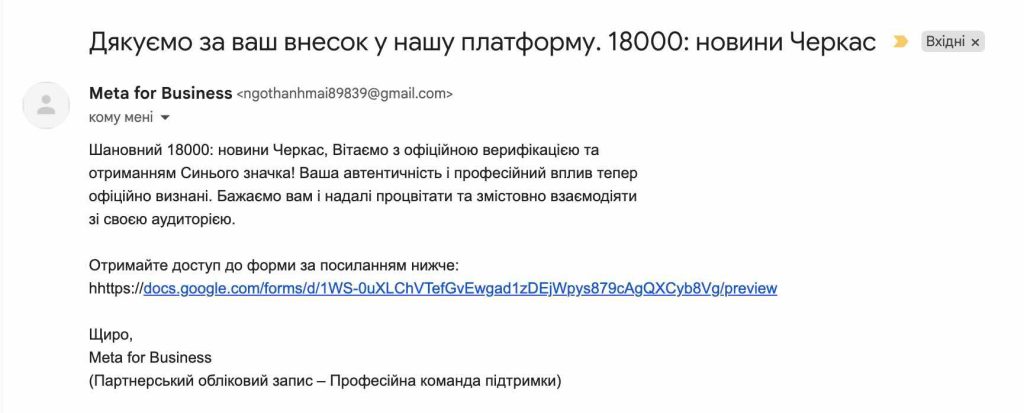
“The email contained manipulative statements intended to play on my emotions and compel me to click the link. The address was also suspicious. Since we had discussed work issues with Meta representatives before, we realised that this was not how their addresses were formatted,” Anastasia said.
How to spot phishing
Maryana Yatsyshyn, security expert at NGO Digital Security Lab, said in a comment to the IMI representative in Cherkasy that there had been a surge in phishing attacks targeting Facebook page administrators with blue check mark offers.
To avoid falling for such scams, she first advises to pay attention to the sender’s email address. In this case, the email was sent from a personal account.
“However, the sender’s address does not always guarantee that the email is authentic, because those can be forged or simply hacked, but in this case we can already see that it is not Meta,” says Maryana, adding that Meta does not send such notifications by mail and does not offer blue checkmarks.
The following link leads to a Google form. It is genuine. According to the expert, scammers use this method to increase trust and avoid checks by Google security services.
“Clicking the link, we see a paragraph offering to subscribe to a platform through a link that does lead to a phishing site. Visually, it resembles a real Facebook link. However, in reality, it is hypertext concealing a link to a completely different website,” says the security expert.
According to her, scammers have been making use of hypertext increasingly often because more and more users try to check the links they are clicking. Such tricks make the link look “legitimate”. However, if you hover the cursor over the link on your computer or touch and hold it on your phone, you will see that the real link is different.
“The phishing website will ask you to fill out a form with information about the administrator’s profile again, and after confirming the form, it asks for the password to your account. The ultimate goal is probably to steal access to the page and/or Meta business account,” concludes Maryana Yatsyshyn.